

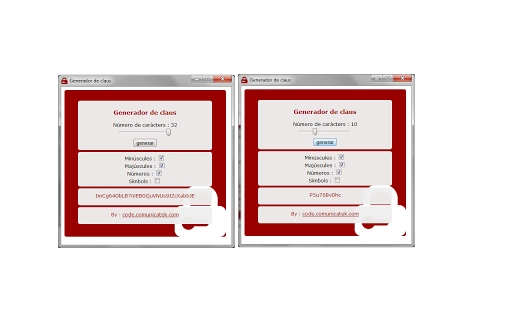
Description
Download Tekpassword – Password Generator, Secure Password Tool
Overview
Tekpassword is a lightweight desktop application designed to simplify the creation of strong, secure passwords with minimal user effort. The software enables users to generate passwords in seconds by selecting desired length and character types, making it ideal for individuals who need reliable password solutions without the complexity of manual composition. It targets everyday users, tech-savvy individuals, and professionals managing multiple online accounts who prioritize security but seek efficiency. The tool is particularly useful in scenarios such as setting up new email accounts, securing cloud storage, or refreshing credentials for sensitive platforms. Developed by Communicatek, Tekpassword is available in English, Spanish, and Catalan, supporting multilingual users across diverse regions. The application is structured around a single core function—password generation—ensuring focused usability without unnecessary features. Its integration with Chrome-based environments suggests a design intent aligned with modern web workflows. While no additional developer background was provided, the consistent release updates indicate ongoing maintenance and user-focused improvements.
Key Features & Capabilities
- Customizable Password Length – Users can define the exact length of their generated password, allowing flexibility for different service requirements, from short codes to extended secure strings.
- Character Type Selection – The tool supports the inclusion of letters, numbers, and symbols, enabling users to tailor password complexity based on security policies or platform restrictions.
- One-Click Generation – With a single click, Tekpassword produces a random, high-entropy password, reducing the risk of weak or predictable patterns.
- Local Storage of Preferences – The application remembers the last-used settings, improving workflow efficiency for repeated use without reconfiguration.
- Multi-Language Support – Available in English, Spanish, and Catalan, the software accommodates users from different linguistic backgrounds, enhancing accessibility.
These features make Tekpassword well-suited for users who frequently create new accounts or update existing passwords. For example, a user managing multiple social media profiles can generate unique passwords for each platform with minimal effort. Similarly, IT administrators may use it to quickly create temporary access codes or test credentials. The ability to avoid predictable patterns reduces the risk of brute-force attacks, contributing to stronger digital hygiene. The software’s minimal interface ensures that even non-technical users can generate secure passwords without confusion or learning curves.
User Interface, Workflow & Performance
Tekpassword features a clean, minimalist user interface focused on core functionality. The layout is straightforward, with clearly labeled input fields for password length and character options, and a prominent generate button. Navigation is intuitive, requiring no onboarding or setup steps. Users can adjust settings, generate a password, and copy it to the clipboard with just a few clicks. The workflow is optimized for speed and simplicity, aligning with the tool’s purpose of instant password creation. Performance is expected to be efficient due to its small size (1.2 MB) and targeted functionality. The developer did not specify resource usage details, but based on general software behavior, it likely consumes minimal CPU and RAM during operation. Stability appears consistent, supported by a series of incremental updates addressing bugs and UI issues such as window sizing and symbol handling. No crashes or performance degradation were reported in the changelog. The application runs without requiring background processes, contributing to a lightweight footprint.
Compatibility & System Requirements
Tekpassword is compatible with both Windows and Mac operating systems, making it accessible to a broad range of desktop users. The software is distributed as a standalone application with a file size of 1.2 MB, indicating a compact and efficient installation. It is designed to run on modern desktop environments, though exact hardware requirements were not listed. The developer did not provide additional system requirements, so users should ensure their system meets general standards for running desktop applications. Installation is straightforward, with no complex dependencies or prerequisites. The application is intended for use on personal computers rather than mobile devices. Given its focus on Chrome integration and lightweight design, it likely functions well on systems with moderate specifications. Compatibility information was partially provided, and users should verify system readiness before installation.
Pros and Cons
Pros
- Fast and simple password generation with one click
- Supports customizable length and character types
- Remembers last-used settings for faster reuse
- Available in three languages: English, Spanish, and Catalan
- Small file size (1.2 MB) ensures quick download and minimal storage use
Cons
- No built-in password storage or manager functionality
- Exact system requirements were not specified
- Limited to password generation—no advanced security features like encryption or autofill
- Only available for Windows and Mac, no support for Linux or other platforms
- No integration with external password managers or cloud sync
FAQ Section
Is Tekpassword safe to use?
Yes, Tekpassword generates passwords locally without transmitting data to external servers. Since it does not store passwords, user data remains private and secure on the device.
Can I use Tekpassword offline?
Yes, the application operates entirely offline once installed. No internet connection is required for password generation or usage.
Does Tekpassword support all character types?
The tool allows users to include letters, numbers, and symbols. Specific symbol sets may be subject to platform or service restrictions, but the application supports a broad range of common characters.
How often are updates released?
Updates are released periodically, with recent versions addressing bugs, improving symbol handling, and fixing UI issues. The latest version is 1.0.14, released on May 5, 2023.
Is Tekpassword free to download and use?
Yes, Tekpassword is available at no cost. There are no subscription fees or in-app purchases required for full functionality.
Final Thoughts + CTA
Tekpassword delivers a focused, reliable solution for generating secure passwords with minimal friction. Its simplicity, speed, and multi-language support make it a valuable tool for users seeking a quick and trustworthy way to create strong credentials. While it lacks advanced features like password storage or sync, its core purpose is executed efficiently and securely. The consistent update history reflects ongoing developer commitment to quality and usability. For individuals who need a no-nonsense password generator, Tekpassword stands out as a lightweight, effective option. Download Tekpassword now and take control of your digital security with confidence.
Guides & Tutorials for TekPassword (App) a password generator App for Chrome
How to install TekPassword (App) a password generator App for Chrome
- Click the Preview / Download button above.
- Once redirected, accept the terms and click Install.
- Wait for the TekPassword (App) a password generator App for Chrome download to finish on your device.
How to use TekPassword (App) a password generator App for Chrome
This software is primarily used for its core features described above. Open the app after installation to explore its capabilities.
User Reviews for TekPassword (App) a password generator App for Chrome 0
No reviews found





